

Last Updated: January 15, 2026
Facebook Off-Activities are a summary of activity that businesses and organizations share with Facebook about your interactions with them, such as visiting their apps or websites. Businesses use Facebook Business Tools, like Facebook Login or Facebook Pixel, to share this information with Facebook. Facebook uses this information to improve your experience on Facebook, such as by showing you more relevant ads.
While Facebook Off-Activities can be useful for improving your experience, they also raise privacy concerns. Businesses can potentially collect a lot of information about your online activity, even if you’re not logged into Facebook. This information can be used to track you across the web and target you with personalized ads.
Here are a few tips for protecting yourself from Facebook Off-Activities:
- Review your Off-Facebook activity. You can see a summary of your Off-Facebook activity by going to your Settings and then clicking “Off-Facebook Activity.” This will show you a list of all the businesses and organizations that have shared information about your activity with Facebook.
- Disconnect your Off-Facebook activity. You can disconnect your Off-Facebook activity from your Facebook account by clicking “Disconnect” next to “Future Off-Facebook Activity.” This will prevent businesses from sharing information about your activity with Facebook in the future.
- Clear your Off-Facebook activity history. You can clear your Off-Facebook activity history by clicking “Clear History” next to “Off-Facebook Activity History.” This will delete all of the information that businesses have shared about your activity with Facebook in the past.
- Use a privacy-focused browser. Some browsers, such as Brave and DuckDuckGo, offer features that can help you protect your privacy from Facebook and other trackers. For example, these browsers can block cookies and other tracking technologies.
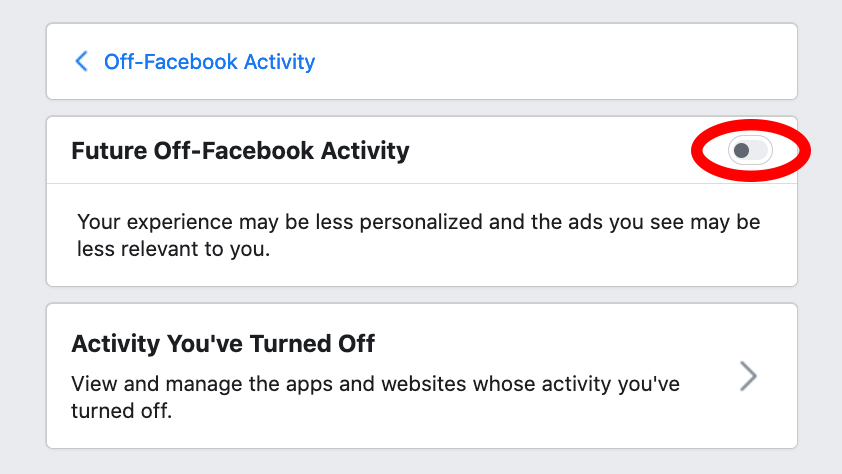
If you’re concerned about your privacy, it’s a good idea to review your Off-Facebook activity and consider disconnecting it from your account. You can also clear your Off-Facebook activity history and use a privacy-focused browser to help protect your privacy online.
Here are some additional tips for protecting yourself from Facebook Off-Activities:
- Be careful about what information you share with businesses and organizations. Only share information that you’re comfortable with being used for advertising purposes.
- Read the privacy policies of websites and apps before you use them. This will help you understand what information they collect about you and how they use it.
- Use a strong password for your Facebook account and enable two-factor authentication. This will help protect your account from being hacked.
By following these tips, you can help protect your privacy from Facebook Off-Activities and other online tracking technologies.
