

Last Updated: January 20, 2026
In the rapidly advancing world of healthcare, the need for streamlined and efficient hospital management systems is more crucial than ever. Developing a custom solution tailored to the specific needs of a hospital can greatly enhance overall efficiency, patient care, and staff productivity. In this article, we will guide you through the process of creating a Hospital Management System (HMS) using PHP and Bootstrap, two powerful technologies that ensure a user-friendly interface and robust functionality.
A simple and responsive Under maintenance html page
Step 9: Creating Demo Files for Hospital Management System
To help you understand the implementation better, we’ve provided some essential demo files and code snippets for key functionalities. You can use these as a foundation and customize them according to your specific hospital’s requirements.
Database Connection (db.php)
<?php
$servername = "localhost";
$username = "root";
$password = "";
$dbname = "hospital_management";
// Create connection
$conn = new mysqli($servername, $username, $password, $dbname);
// Check connection
if ($conn->connect_error) {
    die("Connection failed: " . $conn->connect_error);
}
?>
Ensure to replace the placeholder values with your actual database credentials.
Patient Registration (register.php)
<?php
include('db.php');
if ($_SERVER['REQUEST_METHOD'] == 'POST') {
    // Process form data and insert into the 'patients' table
    // Example: Insert code here
}
?>
Bootstrap Form for Patient Registration (register_form.php)
<!-- Include Bootstrap CSS link in your HTML head section -->
<link rel="stylesheet" href="https://stackpath.bootstrapcdn.com/bootstrap/4.5.0/css/bootstrap.min.css">
<!-- Bootstrap Patient Registration Form -->
<form action="register.php" method="post">
    <div class="form-group">
        <label for="patientName">Patient Name:</label>
        <input type="text" class="form-control" id="patientName" name="patientName" required>
    </div>
    <!-- Add more form fields as needed -->
    <button type="submit" class="btn btn-primary">Register</button>
</form>
<!-- Include Bootstrap JS and Popper.js scripts before the closing </body> tag -->
<script src="https://code.jquery.com/jquery-3.5.1.slim.min.js"></script>
<script src="https://cdn.jsdelivr.net/npm/@popperjs/core@2.5.1/dist/umd/popper.min.js"></script>
<script src="https://stackpath.bootstrapcdn.com/bootstrap/4.5.0/js/bootstrap.min.js"></script>
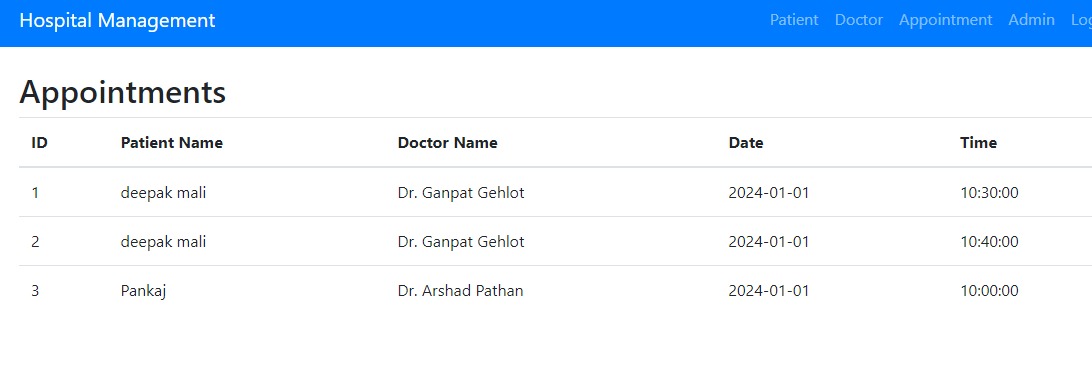
These demo files cover basic patient registration functionality. Similarly, you can create files for appointment scheduling, medical record management, and other features by following the same structure.
Remember to adapt the code according to your database schema and application flow.
Conclusion:
By using these demo files as a starting point, you can expedite the development process of your Hospital Management System. Customize and expand upon these snippets to meet the unique needs of your healthcare facility. The integration of PHP and Bootstrap will ensure a seamless user experience and efficient management of hospital operations.

продвижение сайтов в гугл