
Last Updated: January 15, 2026
Introduction: A Playful Name, A Powerful Tool
In August 2025, Google surprised the world with the launch of its Nano Banana AI, a quirky name hiding an extremely powerful innovation in image editing. Introduced under the Gemini 2.5 Flash model, this tool allows creators, designers, and even casual users to edit images with simple text-based prompts no need for Photoshop-level skills.
Sundar Pichai himself teased the release with 🍌🍌🍌 emojis on X (Twitter), sparking curiosity worldwide. But behind the playful name lies a groundbreaking step toward making AI-driven design more accessible, consistent, and reliable.
What Exactly Is Nano Banana AI?
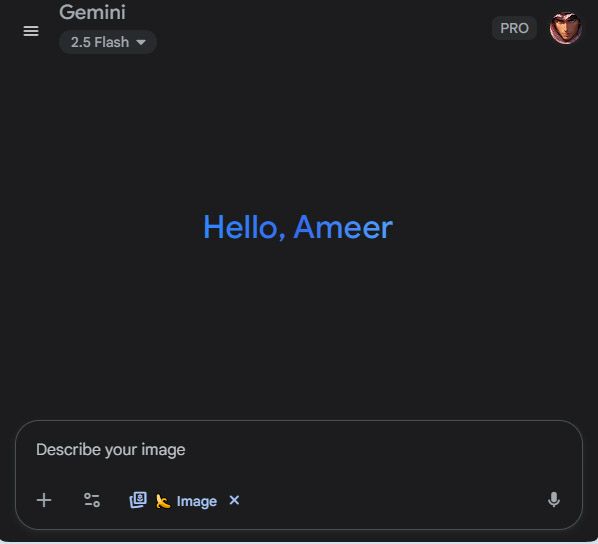
Nano Banana is a prompt-based AI image editing tool integrated into the Gemini app. Unlike traditional AI editors that sometimes distort subjects, Nano Banana ensures:
- Consistency → Faces, pets, and objects look the same across edits.
- Accuracy → Lighting, background, and details remain natural.
- Ease of Use → Just type what you want, and AI does the rest.
Example: Type “Place my dog on a beach mural with the same face as before” → Nano Banana generates a realistic edit in seconds.
Key Features of Nano Banana AI
- Prompt-Based Edits
Users can describe changes in everyday language. No need to master design tools. - Character Consistency
Keeps people, pets, and objects looking the same across multiple edits. - Scene Preservation
Maintains natural lighting, composition, and perspective. - Part of Gemini 2.5 Flash
Uses Google’s ultra-fast rendering engine for real-time results. - Seamless Integration
Available directly inside the Gemini app, no extra downloads required.
Why Nano Banana Matters for Creators
For content creators, social media influencers, and marketing teams, Nano Banana AI offers:
- Faster workflows ⚡
- Consistent branding 🎨
- Cost savings (fewer external editors needed) 💰
- Accessibility for non-designers 🙌
Whether you’re editing product shots, Instagram content, or digital campaigns, Nano Banana delivers high-quality results in seconds.
Nano Banana vs. Other AI Editing Tools
| Feature | Nano Banana AI | Adobe Firefly | DALL·E | Canva Magic Edit |
|---|---|---|---|---|
| Consistency | ✅ Strong | ⚠️ Medium | ⚠️ Low | ⚠️ Medium |
| Ease of Use | ✅ Very Easy | ❌ Advanced | ✅ Easy | ✅ Easy |
| Speed | ✅ Instant | ⚠️ Slower | ✅ Fast | ✅ Fast |
| Integration | ✅ Gemini App | ❌ Separate | ✅ API | ✅ Canva Suite |
| Cost | ✅ Free (for now) | ❌ Paid | ✅ Freemium | ✅ Freemium |
Real-Life Use Cases
- Social Media → Create consistent reels & posts in seconds.
- Marketing → Edit product campaigns without hiring pros.
- Education → Students can design projects without expensive tools.
- Travel Blogs → Place yourself in exotic destinations with natural edits.
Future of Nano Banana AI
Google plans to expand Nano Banana with:
- Video editing support 🎥
- 3D object consistency 🕹️
- Regional language prompts 🌏
- Integration with Google Photos & Workspace
This makes it clear Nano Banana is not just a gimmick, it’s a long-term innovation.
How to Create a Professional Portfolio Website in 2025 (Without Coding)
FAQs About Nano Banana AI
Q1. Why is it called Nano Banana?
Google often uses playful internal names. “Nano Banana” is quirky but memorable.
Q2. Is it free to use?
Yes, Nano Banana is free within the Gemini app (limited beta in August 2025).
Q3. Can I use it without Gemini?
No, currently Nano Banana is exclusive to the Gemini ecosystem.
Q4. Does it work in India?
Yes, India is among the first rollout regions.
Q5. How is it different from Photoshop AI?
Photoshop requires design knowledge. Nano Banana works with simple prompts.
Conclusion
With Nano Banana AI, Google has proven that the future of content creation is fun, accessible, and lightning-fast. Whether you’re a professional or a beginner, this tool makes editing as easy as typing a sentence.
By merging creativity with simplicity, Nano Banana could redefine how we approach design in 2025 and beyond.
The most successful cinematic prompts often combine three main elements: a specific lighting style, a clear composition, and a powerful mood or atmosphere.
Here are 20 of the most used cinematic prompts to generate stunning, stylized images:
High-Contrast & Dramatic
- Noir Film Still: Recreate this as a 1940s film noir movie still, in high-contrast black and white with deep shadows, sharp side lighting, and Venetian blind shadows.
- Cinematic Portrait: A hyper-realistic, high-contrast portrait of a person at a bar, with rim lighting from a single lamp, smoke swirling in the air, and a shallow depth of field.
- Gritty Urban Scene: A cinematic shot of a person walking on a wet city street at night, with neon lights reflecting on the pavement, and a dark, gritty atmosphere.
- Dramatic Close-Up: An extreme close-up on a person’s face, with dramatic chiaroscuro lighting, deep eye shadows, and a sense of suspense.
- Suspenseful Shot: A shot from a low angle, with harsh, overhead lighting casting long shadows behind a solitary figure in a corridor.
Soft & Atmospheric
- Golden Hour: A cinematic shot of a person standing in a field at sunset, with soft golden-hour lighting, lens flares, and a peaceful, nostalgic mood.
- Magical Realism: A surreal, dreamlike scene with a person standing under a glowing tree, with soft, diffused light, and a pastel color palette.
- Misty Forest: A person walking through a dense, misty forest in a cinematic style, with light shafts breaking through the trees and an ethereal mood.
- Rainy Window: A soft-focus shot of a person looking out of a rain-streaked window, with blurry city lights in the background and a melancholy mood.
- Warm & Cozy: An intimate indoor scene with a person sitting by a fireplace, lit by the warm glow of the fire and soft ambient light, with a comfortable atmosphere.
Sci-Fi & Futuristic
- Dystopian Cityscape: A cinematic shot of a person looking over a futuristic, dystopian cityscape, with towering skyscrapers, a dark color palette, and neon highlights.
- Cyberpunk Noir: A high-contrast cyberpunk scene with a person illuminated by glowing holographic advertisements on a crowded street, with heavy rain and a sense of isolation.
- Spaceship Interior: A person standing in the dimly lit control room of a spaceship, with glowing buttons and displays, a deep blue color grade, and a sense of wonder.
- Alien Landscape: A wide shot of a solitary person on a breathtaking alien planet, with two moons in the sky, a purple and orange color palette, and a sense of vastness.
- Futuristic Action: A dynamic, wide-angle shot of a person in a futuristic suit, in mid-jump over a chasm, with dramatic motion blur and glowing energy effects.
Action & Dynamic
- Car Chase: A low-angle shot of a person in a car, with the city lights and background blurred by motion, and a fast, high-energy feel.
- Epic Fantasy: An epic, wide-shot of a character with a sword, standing on a cliff overlooking a massive battle in the distance, with a dramatic sky.
- Steampunk Adventure: A person in steampunk attire, standing on the deck of a flying airship, with industrial elements, a sepia color grade, and a sense of adventure.
- Suspenseful Escape: A shot from a high angle, looking down on a person running through a maze of narrow alleyways, with a tense and urgent mood.
- Post-Apocalyptic Survivor: A cinematic portrait of a person in tattered clothing, standing against a desolate, dusty backdrop with an intense expression, lit by a single, harsh sunlight.
